
If you have started a pilates app, then forgotten the password, then started another, then deleted them all because the notifications got pushy, the answer is not another app. The answer is a tracker that lives in this browser, costs nothing, and never sends you a notification. This page is your tracker. It logs sessions, counts your streak, and shows your progress. No login, no email, no account required for the basic tool. Your data lives in this browser only and never leaves it. The basic tracker is yours immediately.
Pilates Workout Tracker
Log a pilates session below. Your data lives in this browser only — no account, no login, no email needed for the tracker. The page remembers your sessions when you come back.
Log a Session
This Week
Sessions
0
this week
Minutes
0
total
Top Type
—
most logged
Streak
0
weeks
This month: 0 sessions, 0 minutes
Recent Sessions
Log your first session above to get started. Sessions appear here once you save them.
Get the Printable PDF Tracker + Weekly Review Prompts
We will send you a printable PDF version of this tracker (one page per week, fillable), 5 weekly review prompts to use alongside the tracker, a monthly retrospective template, and a motivational email at your week 4 milestone. Free, no spam, easy unsubscribe.
How the Pilates Workout Tracker Works
The tracker has three zones. The Log a Session zone at the top is the form you use after every pilates session. Pick the date, the workout type (Mat, Reformer, Wall, Hybrid, or HIIT), the duration in minutes, the intensity (Light, Moderate, or Vigorous), and optional notes. Hit Log This Session and the entry saves to your browser's local storage immediately. The form clears so you can log again later.
The This Week zone shows four stats calculated from your log: how many sessions you have logged this week, how many total minutes, the most-logged workout type, and your current streak. Streak counts consecutive weeks where you logged at least 2 sessions, with the current week counting as soon as you log your first session. Below the four stats, a smaller line shows your monthly totals for the same metrics. The Recent Sessions zone shows your most recent 10 logged sessions with a small × button to delete any individual entry.
Below the table, two utility buttons let you copy your full log as plain text (useful for emailing yourself a backup or pasting into a spreadsheet) or clear everything (with a confirmation prompt because this cannot be undone). The tracker uses no servers, no accounts, and no analytics on your log data. The data lives in your browser only. If you clear your browser data or switch devices, the log resets. The email lead magnet provides a printable PDF version for visitors who want a more permanent record.
The 4 Stats That Matter for Pilates Consistency
Most fitness trackers throw 12 metrics at you and overwhelm the visitor into ignoring all of them. This tracker focuses on four stats that actually drive consistency. Below is what each one means and why it matters.
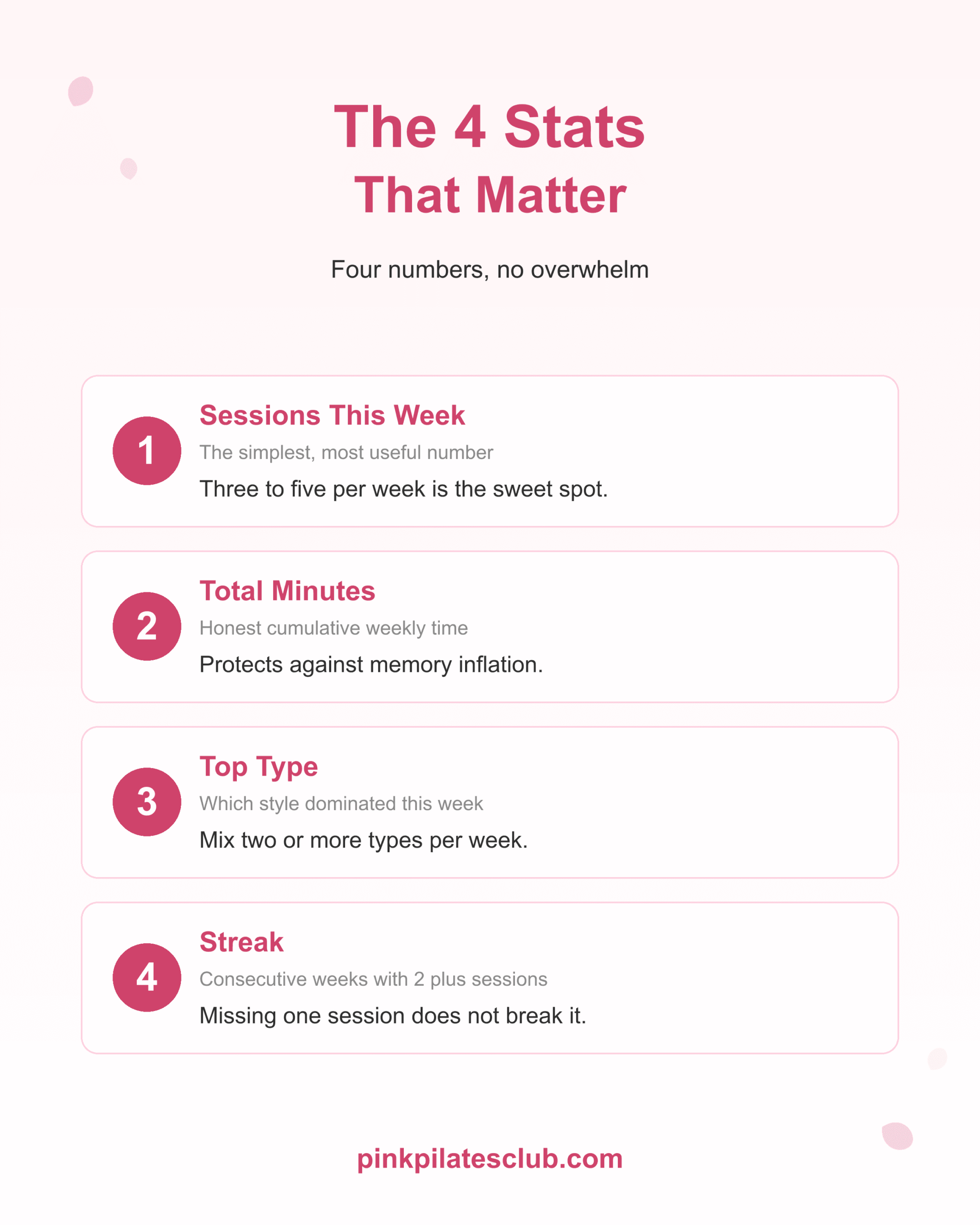
Sessions this week is the simplest and most useful number. Three to five sessions per week is the productive sweet spot for most pilates princesses. Watching this number across weeks tells you whether you are tracking toward your weekly target or drifting. Total minutes this week shows your cumulative weekly time-on-mat. Most pilates princesses underestimate how few minutes they actually trained because individual 30-minute sessions feel longer in memory than they were on the clock. Honest numbers protect against the "I feel like I trained a lot this week" illusion.
Top type this week shows which workout style dominated. Most weeks should mix at least two types (mat plus reformer, or mat plus wall) to avoid pattern-staleness. If your top type is the same every week for a month, the tracker is telling you to add variety. Streak counts consecutive weeks with at least 2 sessions. The threshold is intentionally low: missing one session in a week is not a streak break. The brand philosophy rejects all-or-nothing tracking. A 12-week streak with one or two missed sessions per week is more sustainable than a perfect 4-week streak followed by burnout.
How to Build a Sustainable Tracking Habit
Tracking only works if you actually use the tracker. Below are four levers that turn pilates tracking from a chore into a quiet daily ritual.
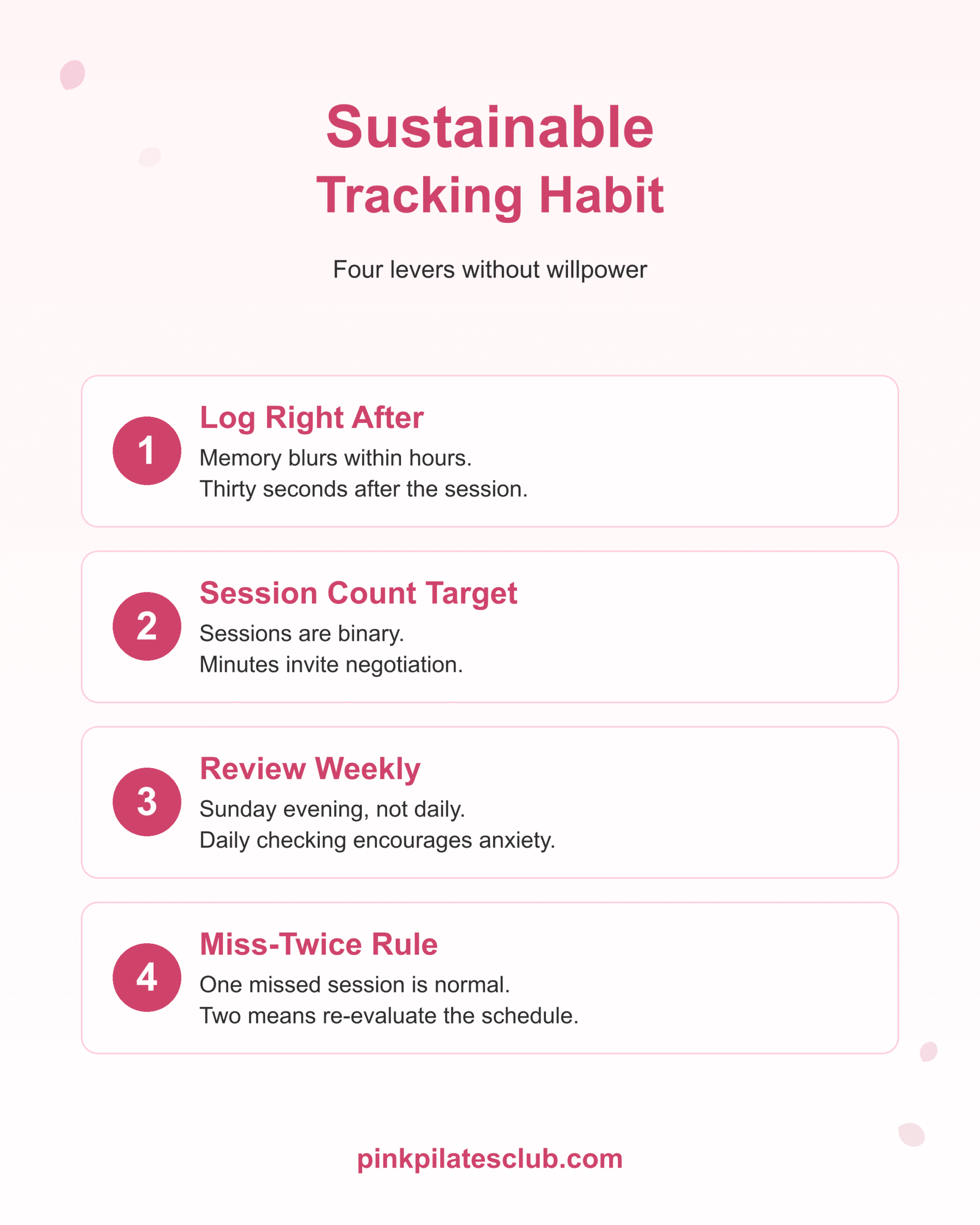
First, log right after each session, not at the end of the week. Memory blurs duration and intensity within hours. Logging immediately after the session takes 30 seconds and produces accurate data. Visitors who try to log "tomorrow" usually log nothing. Second, set a session count target rather than a minutes target. Sessions are binary (you did one or you didn't). Minutes invite negotiation ("I did 25, that's basically 30"). A 4-sessions-per-week target with no minutes constraint produces more consistency than a 120-minutes-per-week target.
Third, review the tracker weekly, not daily. Daily checking encourages anxiety patterns the brand explicitly rejects. Sunday evening is a good review point: see what last week looked like, set a number target for the coming week. Fourth, use the miss-twice rule. Missing one session in a week is normal and the streak should not break. Missing two sessions in a row in the same week means the schedule itself is wrong, not your willpower. Re-evaluate the weekly target rather than berating yourself. The tracker is a measurement tool, not a verdict.
Tracking vs Just Doing — Why the Tracker Helps
Some pilates princesses argue tracking is overkill: just do the work. The argument is sympathetic but the evidence runs the other way. Pilates princesses who track see consistency improve and patterns emerge that a just-do approach cannot surface.
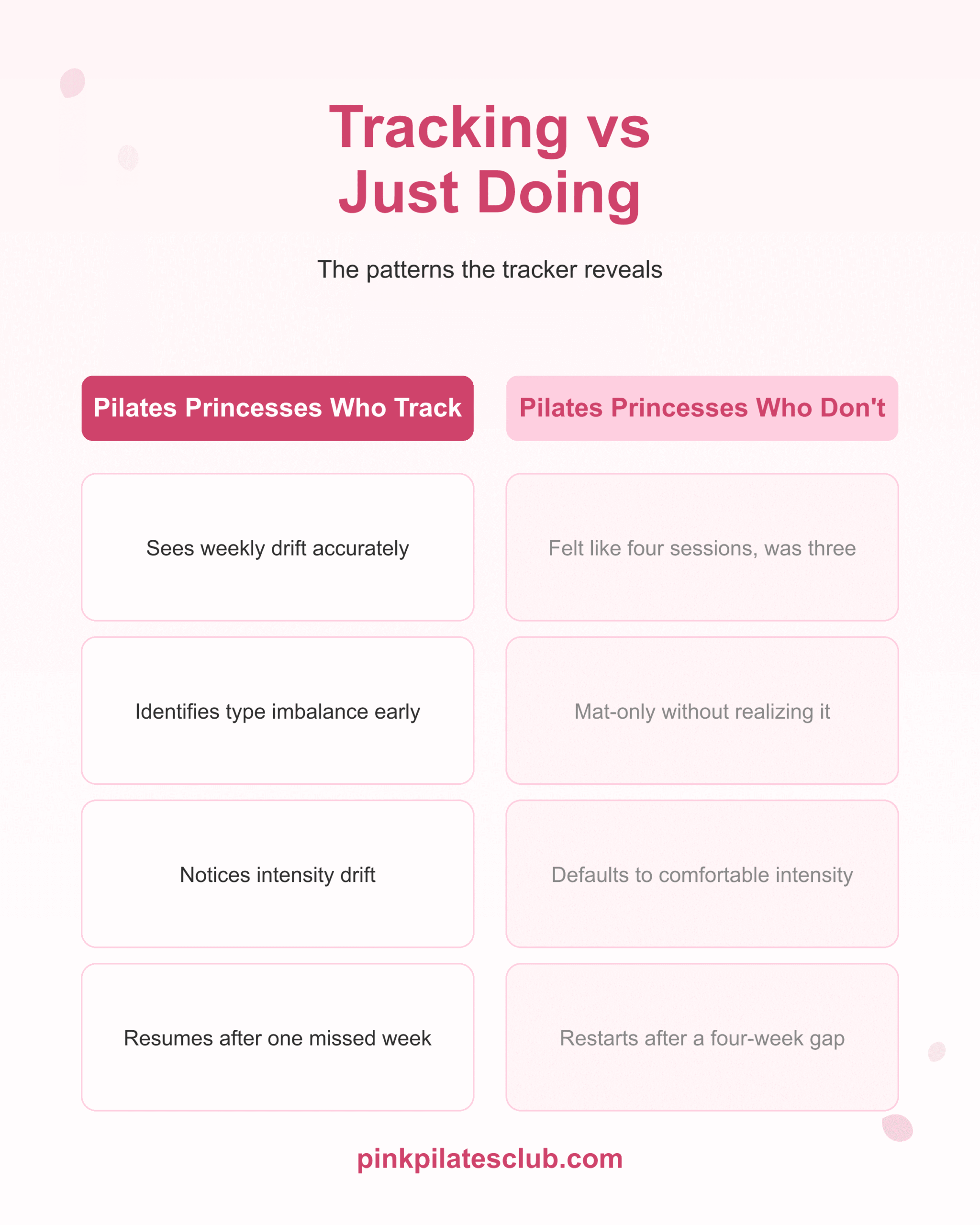
Tracked practice surfaces three things that intuition misses. First, weekly drift. The week you "felt like" you trained four times sometimes turns out to be three. The week you "felt like" you barely trained sometimes was a five-session week. Memory is unreliable; the log is reliable. Second, type imbalance. A pilates princess who does mat 5 days per week and tells herself she does "all kinds of pilates" is sleeping on reformer entirely. The Top Type stat surfaces this within two weeks. Third, intensity drift. Most pilates princesses gradually default toward Moderate intensity and stop logging Vigorous sessions over time, even when their schedule still calls for them. Watching the intensity column reveals when the practice has become more comfortable than productive.
Just-doing pilates princesses also restart often. They do four good weeks, then a stressful week breaks the pattern, then they "start again next month" and the gap stretches. Tracked pilates princesses see the gap on the page and tend to resume after one missed week rather than after four. The tracker is not a discipline tool; it is a reality tool. The reality is consistent practice over months and years; the tracker just makes that reality visible.
The 30-Day Full Body Pilates Program
Want a structured monthly program that pairs naturally with the tracker? The 30-Day Full Body Pilates includes restorative, standard, and interval sessions across the month, so the tracker fills with a productive distribution rather than a flat one. The program tells you what to do; the tracker confirms you did it. For visitors specifically struggling with consistency, The Pilates Consistency Cheat Code ($17.97) is the lower-priced consistency-only option.
$99.97 · instant digital access
Frequently Asked Questions
Is the pilates workout tracker free?
Yes, completely. No account, no login, no credit card. Log as many sessions as you want and use the tracker for as long as you want. The optional email lead magnet sends a printable PDF version plus weekly review prompts, but the basic tracker on this page is fully usable without entering any email.
Where is my workout data stored?
In your browser's local storage. The data never leaves your device, never reaches our servers, and we have no way to see what you logged. Pink Pilates Club has zero analytics on tracker entries. This is brand-aligned: gentle, low-friction, no surveillance.
What if I clear my browser cookies or change devices?
The log resets. Local storage is browser-specific and device-specific. To preserve a log across devices or browser resets, use the Copy Log as Text button periodically and paste the export into an email to yourself or a notes app. The email lead magnet also provides a printable PDF version for visitors who want a permanent paper record.
How many sessions per week is good for pilates?
Three to five sessions per week is the productive sweet spot for most pilates princesses. The threshold is mainly about consistency over time rather than weekly volume. The streak counter rewards 2-plus sessions per week as the minimum baseline; 4-plus produces faster body composition results without overreaching.
Why does the tracker not send me reminders?
Notification fatigue is real, and most pilates apps push aggressively to drive engagement metrics that benefit them more than they benefit you. The tracker stays silent on purpose. The Sunday-evening weekly review pattern (open the tracker, see last week, plan next week) replaces app notifications with a quiet ritual you control.
Can I track reformer and mat sessions together?
Yes. The Workout Type radio includes Mat, Reformer, Wall, Hybrid, and HIIT. Log each session under whichever type fits best. The Top Type stat surfaces which type dominated each week, which is useful for ensuring you mix styles across the month rather than drifting into mat-only or reformer-only patterns.
Your Next Step
You have the tracker. The next step is logging your first session above. If you want a personalized printable PDF version plus weekly review prompts, take the email plan offered in the panel above. If you are ready for a structured monthly program that pairs naturally with the tracker, the 30-Day Full Body Pilates is the next step. You do not need to track perfectly. You just need to log this week's first session.
Keep Reading
- the Pilates Calorie Burn Calculator to log calorie burn alongside sessions
- the Wall Pilates Calorie Burn Calculator for wall-specific sessions
- our Pilates Weight Loss Calculator for pound projections from tracked consistency
- the Pilates vs Yoga Calorie Comparison if you do both practices
- the Hormone Balance Quiz for the symptom-side hormone read
- the Posture Assessment Quiz to track structural alignment
- the Pilates Protein Calculator for daily protein targets
- the Anti-Bloat Food Quiz to find your bloating triggers
- the Pilates Results Timeline so tracked sessions match expected results
- the 7-Day Pilates Plan generator for a starter week to track
- the Pilates Program Quiz to match yourself to a structured plan
- the Cycle Syncing Pilates Planner for cycle-aware programming
- the 30-Day Pilates Challenge if you want a structured month to track
- the Reformer Spring Resistance Calculator to load the right springs
- the Pilates Afterburn Calculator for the post-session burn
- the Cortisol Stress Quiz since cortisol affects what tracker patterns to target
- the Postpartum Pilates Planner for safe phased return after birth
- the Reformer Pilates Calorie Calculator for reformer-specific burn
- the Pilates TDEE Calculator for the daily energy picture
- the Pilates Heart Rate Zone Calculator for training intensity
- the Waist-to-Hip Ratio Calculator for body shape tracking